My Project
This is my Python Mancala project I made in coding class. You can download the game and try it out yorself!
How to Play
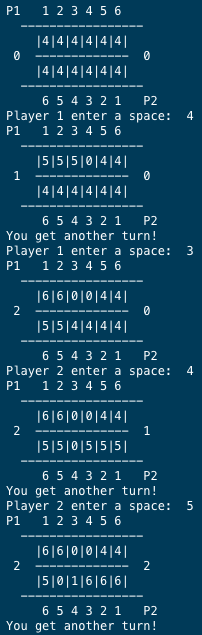
This version is a two player game of mancala so start by grabbing a friend to play with you. Choose who is going to go first. Each player makes a moving by choosing a space (1 through 6). You can see the space numbers printed above or below the board in the terminal. Once you choose a space, the program will take all the stones stored in that space and move around the board, dropping on stone in each space that it passes. If your last stone lands in your goal, you get another turn. If your last stone lands in an empty space on your side and the other player has stones in the space opposite, you get all those stones as well as your last stone added to your goal.
The Code
This project was pretty hard to make. I had to make lots of different functions. The psudocode for the project looked like this:
Main Function:
    initialize board

    while game is not over:
        print board
        get player input
        make move and update board
        switch to next player
The first function I made was the print_board()
function. I had to use string formatting to get the board to print out
nicely. Next I wrote a function for getting the user input. I used
error handling to make sure that the user could only enter a number and
I also had to check if they choose a legitimate space.
The hardest function to write was the update board function. Figuring out how to move around the board took a lot of work and careful manipulation of list indecies. I also had to take into account all the unusual cases like the last stone ending in a goal or an empty space.
Once the update board function was done, the last function left was just the function that checks whether or not the game is over. A game of Connect 4 ends when someone gets 4 in a row or the entire board is full. After completing that, all that was left was to put the whole game together.